Remote OpenClaw Blog
7 Signs You Need AI Help Managing Your Workload
13 min read ·
You are working hard. You are always busy. But somehow the important things keep slipping through the cracks. Your inbox is overflowing, your to-do list grows faster than you can check things off, and by the end of the week you feel exhausted without having moved the needle on anything meaningful.
This is not a discipline problem. It is a systems problem. And it is exactly the kind of problem AI was built to solve.
Here is what it looks like in practice:
Here are seven signs that your workload has outgrown manual management — and that AI can make an immediate, measurable difference.
1. You Spend More Than 2 Hours Daily on Repetitive Tasks
Think about your typical day. How much time goes to tasks that follow the same pattern every time — sorting emails, updating spreadsheets, copying data between tools, formatting reports, sending the same types of messages?
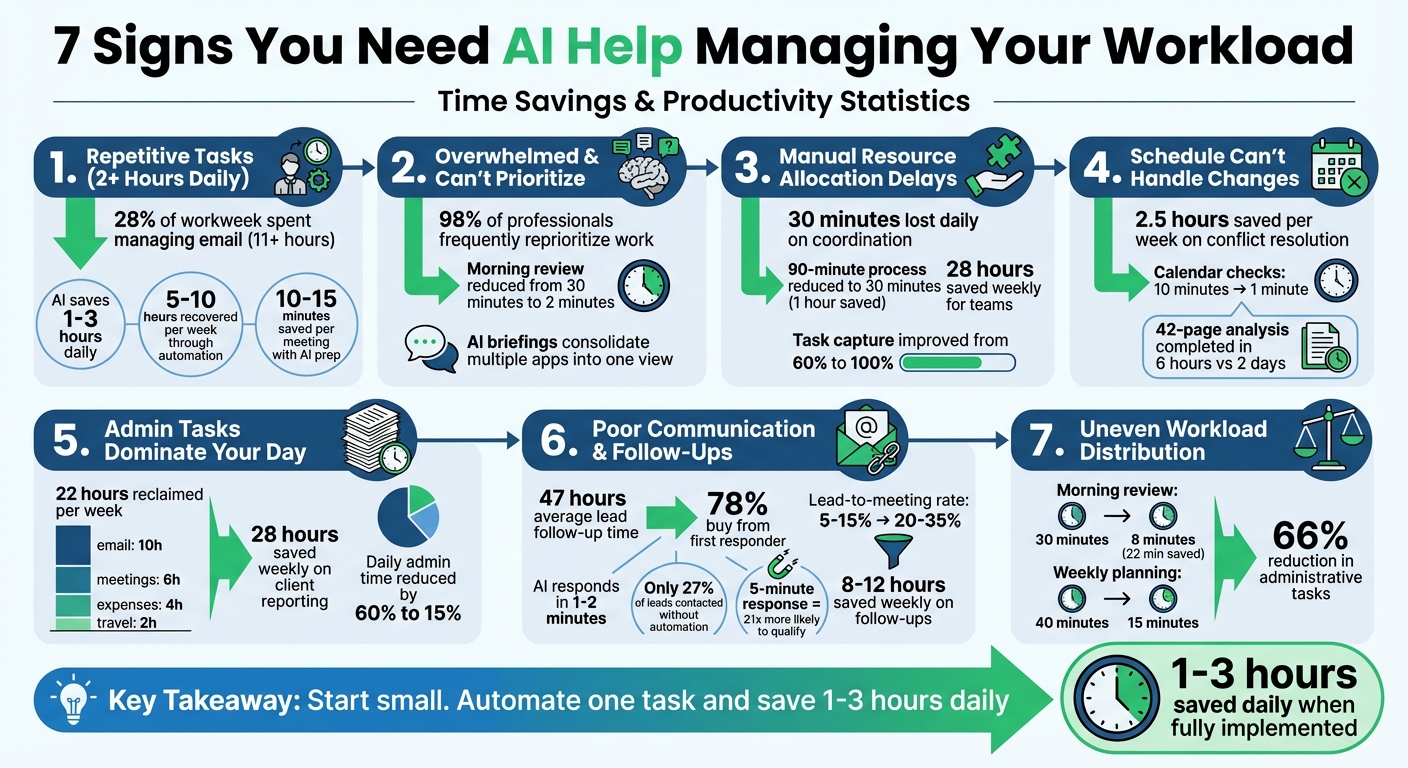
Research shows that professionals dedicate 28% of their workweek to managing email[3]. That is nearly a third of your workweek[3] consumed by a single repetitive task. Add in status updates, data entry, and routine reporting, and you can easily lose half your productive hours to work that does not require your expertise or judgment.
The pattern is clear: if a task follows a predictable sequence of steps, it can be automated. AI assistants can sort and prioritize your inbox, draft routine responses, update project trackers, schedule follow-ups all through one conversational platform[3], and generate recurring reports — all without your involvement.
The impact is immediate. Many users report saving 1 to 3 hours daily[3] after properly configuring their AI assistant. That translates to 5 to 10 hours per week[4] you can redirect toward strategy, creative work, or simply leaving the office at a reasonable hour.
Even a modest AI setup saves you over 10 minutes a day[1] on email triage alone. Scale that across every repetitive workflow, and the gains compound fast.
What to automate first:
- Email triage and priority sorting
- Meeting notes and follow-up action items
- Status report generation from existing data
- Routine messages and acknowledgments
- Data entry and cross-tool updates
Focus on one time-consuming task[3] at a time. Start where the pain is sharpest, prove the time savings, then expand.
2. You Feel Constantly Overwhelmed and Can't Prioritize
When everything feels urgent, nothing gets prioritized properly. You bounce between tasks, respond to whoever is loudest, and end the day wondering what you actually accomplished.
This is not a personal failing. 98% of project and portfolio management professionals report frequently having to reprioritize work due to shifting business demands[6]. The problem is that human brains are not wired to continuously reassess dozens of competing priorities while also doing the work itself.
AI changes the equation by handling the prioritization layer. Prescriptive AI uses real-time data to adjust schedules[6], analyze your task list against deadlines, dependencies, and strategic importance, then surface the three things that actually matter today. When new requests come in, AI can slot them into the priority framework without you needing to stop what you are doing.
This is not about letting AI make your decisions. It is about giving you a clear picture so your decisions are faster and better. Instead of spending 30 minutes every morning[2] figuring out what to work on, you get a snapshot of your day in just 2 minutes[2] reviewing what your AI assistant has already organized.
Signs you need AI-driven prioritization:
- You start the day without a clear plan for your top 3 priorities
- New requests constantly derail your planned work
- You frequently miss deadlines because something "more urgent" came up
- You feel busy all day but cannot point to meaningful progress
- You regularly work late just to catch up on tasks that should have been done earlier
3. Manual Resource Allocation Creates Delays
If you manage a team — even a small one — you know the pain of resource allocation. Who has capacity? Which project needs more people? Is the timeline realistic given current workloads?
Manual resource allocation fails because it relies on outdated information. By the time you have surveyed your team, reviewed timelines, and made assignments, the situation has already changed. Someone got pulled into a client emergency. A deadline moved up. A team member called in sick.
AI solves this by tracking capacity and workload in real time. It can monitor task completion rates, flag bottlenecks before they cause missed deadlines, and suggest reallocation when someone is overloaded. Instead of weekly resource planning meetings that produce a plan that is outdated by Tuesday, you get continuous, adaptive resource management.
"We tripled our client capacity without hiring. OpenClaw handles everything that doesn't require human judgment." — Marcus, marketing agency owner
Marcus ran a 12-person agency where team members spent hours each week logging into platforms, copying data, formatting reports[5]. After implementing AI automation for client reporting alone, his team saved 28 hours weekly[5]. What used to take four people a full day now runs overnight.
The result is fewer delays, fewer surprises, and teams that actually deliver on time — not because people work harder, but because work is distributed more intelligently.
Where AI improves resource allocation:
- Real-time capacity tracking across team members
- Automatic bottleneck detection and early warnings
- Workload rebalancing suggestions based on actual data
- Timeline forecasting that accounts for current velocity
- Cross-project dependency mapping
4. Your Schedule Can't Handle Unexpected Changes
Your calendar looks perfect on Monday morning. By Monday afternoon, half of it is wrong. A meeting ran long, a client needs an urgent call, and now everything needs to shift — but you do not have time to rearrange it all.
Rigid schedules break under real-world conditions. The more meetings and commitments you have, the more fragile your calendar becomes. One disruption cascades into a full day of chaos.
AI-powered scheduling handles this by treating your calendar as a dynamic system, not a static document. When something changes, AI can adjust your day dynamically when surprises arise[7], automatically suggesting rearrangements that protect your high-priority blocks, maintain buffer time between meetings, and account for travel time or preparation needs. It is also catching double-bookings before they become a problem[8], resolving conflicts before you even notice them.
Better yet, AI can learn your patterns over time. It knows you do your best deep work in the morning, that you need 15 minutes between calls to decompress, and that Friday afternoons are for planning — and it schedules accordingly. It can also allow AI to instantly update your calendar and shift priorities[2] when something unexpected lands in your inbox.
One team reported that their AI assistant combined them into one session that worked for everyone[9] — three separate meetings collapsed into a single, well-structured block. The calendar savings add up to 2.5 hours per week[8] in recovered scheduling overhead alone.
Scheduling problems AI can solve:
- Automatic rescheduling when conflicts arise, including rescheduling requests that fit everyone[2]
- Protecting focus blocks from meeting creep
- Smart meeting scheduling that respects energy patterns
- Travel and preparation time buffers
- Multi-timezone coordination for distributed teams
5. Administrative Tasks Take Up Too Much Time
Invoicing, expense tracking, contract management, compliance documentation, HR paperwork — none of this is the work you were hired to do, but it still needs to get done. And for many professionals, especially founders and small team leaders, administrative overhead quietly consumes hours every week.
The problem is not that any single admin task takes long. It is the cumulative weight. Fifteen minutes here, twenty minutes there, and suddenly you have lost an entire afternoon to work that adds zero strategic value.
Consider this: Jenny, an executive assistant who started using AI for administrative tasks, reported saving 22 hours per week[5]. That is more than half a standard work week reclaimed from admin overhead. She automated email sorting, meeting prep, travel booking, and routine correspondence — tasks that were necessary but did not require human judgment for every step.
Tasks like tracking follow-ups, prepping for meetings[1], and compiling reports are perfect candidates for AI. Each meeting alone costs 10 to 15 minutes per meeting[1] in preparation overhead that AI can eliminate entirely. AI can also pull action items from meeting notes[1] and route them to the right person automatically.
AI handles administrative tasks effectively because most admin work follows rules. If this type of invoice, then this process. If this expense amount, then this approval flow. If this contract clause, then this review step. Rules-based work is exactly where AI excels.
"I was drowning in admin before I set up automation. Now I spend my mornings on strategy instead of spreadsheets." — Abdul Tayyeb Datarwala
The total time savings from AI-powered admin automation is typically 1 to 2 hours daily[1], with email triage alone saving 20–30 minutes daily[1]. That works out to 22 minutes saved every single day[1] on meeting prep alone. AI also keeps track of pending tasks, sending reminders when follow-ups are overdue[1] — so nothing slips through the cracks.
Best Next Step
Use the marketplace filters to choose the right OpenClaw bundle, persona, or skill for the job you want to automate.
Administrative tasks to hand off to AI:
- Invoice generation and tracking
- Expense categorization and reporting
- Meeting agenda preparation and minutes distribution
- Travel booking and itinerary management
- Routine correspondence and acknowledgments
- Document formatting and compliance checks
6. You Struggle with Communication and Follow-Ups
The deal looked promising. The prospect was interested. And then... nothing happened. Not because they lost interest, but because your follow-up fell through the cracks. Three weeks later, you remember — but by then they have already gone with a competitor.
This happens more often than anyone admits. 78% of customers buy from the company that responds first[10]. Yet the average lead follow-up time is 47 hours[10] — nearly two full days. Worse still, only 27% of leads ever get contacted[10] at all. The rest simply evaporate.
And it is not just sales. Internal communication suffers the same fate. Diego's team, for instance, saw their action item capture rate jump from 60% to nearly 100%[2] after implementing AI-powered meeting notes. Before that, 60% of verbal agreements[2] made in standups were never captured or followed up on. The client question that sat unanswered for a week. The vendor email that got buried under 50 other messages.
AI eliminates follow-up failures by responding in 1–2 minutes[10] instead of hours or days. It tracks every conversation thread across Telegram, WhatsApp, Slack, and Gmail, triggering reminders — or sending follow-ups automatically — when a response is due. It does not forget. It does not get distracted. It does not let a warm lead go cold because you had a busy week.
The results speak for themselves: multi-channel outreach achieves 3–5x[10] higher response rates than single-channel approaches. Responding in 5 minutes makes you 21x more likely[10] to qualify the lead compared to waiting 30 minutes. And AI-automated follow-up sequences can flag "hot" leads[11] the moment they engage, so your team can focus on closing rather than chasing.
"Speed to lead is the single biggest predictor of conversion. If you are not responding within 5 minutes, you are losing money." — Espen
With AI handling the follow-up layer, businesses see a 20–35%[10] lead-to-meeting conversion rate, compared to 5-15% without automation. Every interaction is logged automatically, cutting down on errors and stale data[12] in your CRM.
Communication tasks AI can manage:
- Automated follow-up sequences for leads and prospects — saving 8 to 12 hours per week[11]
- Meeting action item tracking and reminder distribution
- Client communication monitoring and response time alerts
- Vendor and partner correspondence management
- Internal status update distribution
- Drafting context-aware responses based on conversation history
7. Uneven Workload Distribution Is Causing Burnout
Some people on your team are drowning. Others have capacity. But nobody talks about it because everyone is "fine" — until someone quits, burns out, or starts delivering lower-quality work.
Uneven workload distribution is one of the leading causes of workplace burnout, and it is almost always invisible until it becomes a crisis. The top performer gets more work because they deliver. The squeaky wheel gets less because they push back. And the quiet, reliable person in the middle slowly sinks under a load that nobody notices.
AI makes workload distribution visible and actionable. By tracking task volume, completion rates, and working hours across team members, AI can surface imbalances early — before they cause burnout. It can suggest redistributions, flag when someone has been consistently overloaded, and ensure that capacity planning is based on actual data rather than assumptions.
"We didn't realize how unevenly the work was distributed until we saw the data. Two people were doing 60% of the output." — Sarah
Marcus's agency is a clear example. His team was saving 28 hours per week[5] on automated client reporting alone — time that had previously fallen on the same two or three people. By redistributing the remaining human-required tasks with AI-driven capacity insights, no single person carried a disproportionate load. Lead qualification that used to take 4 hours to just 2 minutes[11] with AI handling the initial screen, and the conversion rate improvement of 75%[11] meant fewer wasted hours for the sales team.
This is not about micromanaging. It is about giving leaders the information they need to make fair, sustainable work assignments. When workloads are balanced, quality goes up, turnover goes down, and teams actually perform better.
Warning signs of uneven workload distribution:
- Some team members consistently work late while others leave on time
- Quality drops on projects assigned to your busiest people
- Top performers show signs of disengagement or frustration
- New tasks default to the same 2-3 people regardless of capacity
- Exit interviews cite workload as a contributing factor
Conclusion: Start with One Workflow and Scale from There
If you recognized yourself in three or more of these signs, your workload has outgrown what manual management can handle. The good news is that AI does not require a massive overhaul to make a difference.
Take Sonia, a project manager juggling three client accounts[2]. Her morning briefings that used to take 30 minutes across multiple apps now take just 8 minutes[2]. Weekly planning sessions have been trimmed from 40 minutes to 15[2]. Her daily 30-minute morning review across five apps[2] collapsed into a single briefing. Sonia streamlined her workflow by automating the cross-referencing[2] of tasks, deadlines, and client communications — and her client reporting time dropped from 90 minutes to just 30[2].
"I started with just email triage. Within a week I was hooked. Within a month I had automated half my admin." — Oh My OpenClaw
Here is how to get started:
- Pick your biggest pain point. Which of the seven signs resonates the most? That is where AI will deliver the fastest ROI.
- Start with a single tool. You do not need to automate everything on day one. Try Compass for personal task management [1] to summarize your schedule, key deadlines, and reminders in under 30 seconds[1] each morning. OpenClaw Cloud even offers a free tier[3] so you can test the waters without any commitment.
- Measure the difference. Track your time for one week before and after. The numbers will justify expanding to additional workflows.
- Connect your tools. Link your AI assistant to ClickUp, Google Analytics, Meta Ads, and your CRM. The more context AI has, the better it performs.
Many users report saving 1 to 3 hours daily[3] within the first week. That is time you can spend on strategy, creative work, or simply going home on time.
Frequently Asked Questions
Which task should I automate first with AI?
Start with the task that eats up the most time. For most people, that means managing emails, scheduling, or follow-ups. These are high-frequency, low-complexity tasks where AI delivers immediate ROI — you will feel the difference within the first week.
How do I know if AI will actually save me time?
AI saves the most time on repetitive, time-intensive tasks like inbox management, drafting proposals, and monitoring communications. If you spend more than 2 hours a day on tasks that follow a predictable pattern, AI can likely cut that in half or more. Track your time for one week before and after implementing AI — the numbers will speak for themselves.
Can AI help my team balance workloads and prevent burnout?
Yes. AI can automate repetitive tasks so no single team member carries a disproportionate load. It can also identify early warning signs of burnout — like excessive overtime, missed deadlines, or declining response quality — and flag them before they become serious problems.