Remote OpenClaw Blog
Complete Checklist: Choosing the Right AI Persona
7 min read ·
Picking an AI persona isn't about finding the "best" one — it's about matching the right capabilities to the tasks that actually eat your time. The wrong persona sits idle. The right one saves 10-20 hours per week from day one.
This checklist walks through every decision point: what each persona does, which tasks map to which persona, tool requirements, budget math, and how to test before committing. By the end, you'll know exactly which persona (or combination) fits your workflow.
What Are AI Personas?
An AI persona is a pre-configured Claude-powered agent running on OpenClaw with a specific role, skill set, and communication style baked in. Unlike a blank chatbot that needs a prompt every time, a persona comes with a SOUL.md file (its identity and rules), pre-built skills, a memory system, and a daily operational schedule[1].
Think of it as hiring a specialist rather than a generalist. A generalist AI can do anything you ask in the moment. A persona does specific things without being asked — because its role, triggers, and boundaries are already defined[2].
"Atlas is your AI chief of staff. It manages your inbox, calendar, and daily operations so you can focus on the work that actually moves the needle." — Zac Frulloni[6]
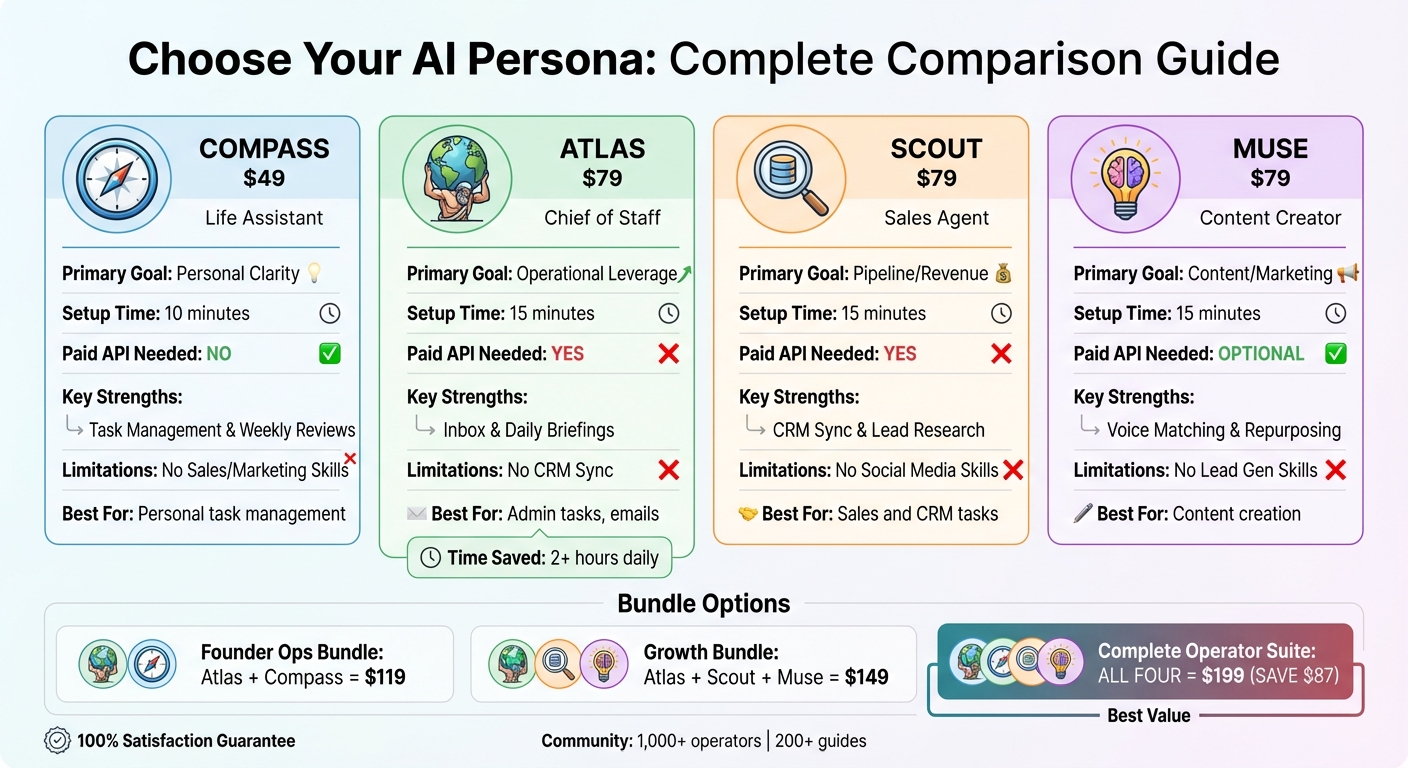
Remote OpenClaw currently offers four personas in the marketplace: Atlas (chief of staff), Scout (sales and leads), Muse (content creation), and Compass (personal operations). Each targets a different category of repetitive work[7].
Matching Personas to Your Tasks
The fastest way to pick the right persona is to identify which task category consumes the most time in your week, then match it to the persona built for that category.
Atlas: Email, Calendar, and Daily Operations
If your biggest time sink is email, Atlas is where you start. The average professional spends 2.5 hours daily managing email — roughly 650 hours per year[3]. Atlas automates inbox triage, draft responses, calendar coordination, and daily briefings. It categorizes every message into URGENT, IMPORTANT, FYI, and NEWSLETTERS, then handles each bucket according to your rules.
Best for: Founders, executives, and operators who spend 2+ hours daily on email and calendar management.
Scout: Sales, Leads, and Follow-Ups
If revenue depends on lead response speed, Scout is the choice. It monitors inbound leads, sends initial responses within minutes, qualifies prospects with conversational questions, and updates your CRM automatically. Scout also handles follow-up sequences triggered by prospect behavior[4].
Best for: Service businesses, agencies, and B2B operators where speed-to-lead directly impacts close rates.
Muse: Content Creation and Distribution
If content marketing is important but unsustainable at your current pace, Muse handles first drafts, research compilation, SEO optimization, and format adaptation across platforms. It turns one piece of content into posts for LinkedIn, email newsletters, and social media[5].
Best for: Consultants, coaches, and founders who know content works but can't sustain 10-15 hours per week creating it.
Compass: Personal Operations and Briefings
If your mornings start with 45-60 minutes of scrolling through Slack, email, and dashboards before doing real work, Compass compiles everything into a single morning briefing. It also handles weekly reviews, task tracking, and priority recommendations.
Best for: Solo founders and operators who need a structured daily workflow without hiring an executive assistant.
Checking Tool Compatibility
Before choosing a persona, verify that it connects to the tools you already use. Every persona integrates with Discord, WhatsApp, Telegram, and Slack as messaging channels. The differences are in the workflow-specific integrations.
Atlas connects to Gmail, Google Calendar, and Outlook. Scout integrates with HubSpot, Salesforce, and Airtable for CRM. Muse works with Google Docs, Buffer, and content management systems. Compass pulls from all calendar and messaging sources to generate briefings.
The OpenClaw ecosystem includes 10,700+ skills[8] that extend persona capabilities — so if your specific tool isn't covered out of the box, there's likely a community skill that bridges the gap.
Best Next Step
Use the marketplace filters to choose the right OpenClaw bundle, persona, or skill for the job you want to automate.
"The quality of a persona config determines everything. A well-configured persona with three skills outperforms a poorly configured one with thirty." — Sawyer Ruhl[9]
Budget Planning
Persona costs break down into three components: the one-time persona purchase, ongoing API usage, and optional hosting.
One-Time Persona Cost
- Compass
- Atlas
- Scout
- Muse
- Complete Suite (all four) — best value
Ongoing API Costs
LLM API usage typically runs $8-30 per month depending on the model (Claude Haiku is cheapest, Sonnet is mid-range, Opus is premium) and how actively the persona operates. Most single-persona operators land around $15-25/month. You can cap spending using the clawctl budget command to set daily or monthly limits[11].
Optional VPS Hosting
If you run OpenClaw on a cloud VPS instead of local hardware, hosting adds $5-10/month. Hostinger, DigitalOcean, and Hetzner are the most popular options among operators.
ROI Math
At $15-35/month total ongoing cost, even modest time savings pay for themselves quickly. If a persona saves 10 hours per week and your effective hourly rate is $50, that's $2,000/month in recovered time against $35/month in costs — a 57x return. Independent analysis puts the range at 25-94x ROI depending on the persona and use case[10].
"At $15/month in API costs and 10+ hours saved weekly, the ROI math isn't even close. You're looking at 25-94x return depending on your hourly rate and usage pattern." — OpenClaw Cost Guide[10]
Testing and Deployment
Don't deploy a persona on your highest-stakes workflow first. The testing process should follow a deliberate sequence to build confidence before you hand over critical operations.
Step 1: Start with a Low-Risk Workflow
Connect the persona to a secondary email account or a test Slack channel. Let it run for 48-72 hours on non-critical tasks — newsletter sorting, FYI categorization, or draft content for internal review. This gives you a feel for its judgment and tone without any risk[12].
Step 2: Review and Tune
After the initial test period, review every action the persona took. Adjust the SOUL.md tone settings, modify skill parameters, and update any rules that produced unexpected results. Most operators need 2-3 rounds of tuning before the persona matches their voice and preferences.
Step 3: Expand to Primary Workflows
Once you're satisfied with the persona's judgment on test workflows, connect it to your primary tools. Enable execution approval controls so the persona asks before taking high-impact actions (sending external emails, updating CRM records, scheduling meetings with clients).
"Automation is a reward for reliability. Prove the persona works on low-stakes tasks before you let it touch anything that matters." — OpenClawCrew[13]
Step 4: Remove Training Wheels
After 1-2 weeks of supervised operation, start loosening approval controls on workflows where the persona has demonstrated consistent accuracy. Most operators reach full autonomous operation within 2-3 weeks.
The Complete Decision Checklist
Use this checklist to work through your persona selection systematically:
- Identify your top 3 time-consuming tasks — track time for one week if you don't already know
- Map each task to a persona category — email/calendar (Atlas), sales/leads (Scout), content (Muse), daily ops (Compass)
- Check tool compatibility — verify your CRM, email provider, messaging app, and other tools connect to the persona
- Calculate your budget — one-time persona cost + estimated monthly API usage ($8-30) + optional hosting ($5-10)
- Calculate expected ROI — hours saved per week x your effective hourly rate vs monthly cost
- Choose your starting persona — pick the one that addresses your single biggest time cost
- Plan your test period — identify a low-risk workflow to start with and set a 48-72 hour test window
- Prepare your deployment environment — VPS or local hardware, API keys, messaging channel connections
- Deploy and tune — run the test, review results, adjust SOUL.md and skill parameters
- Expand and automate — move to primary workflows with approval controls, then loosen as confidence builds
If two or more personas address significant time costs, consider the Complete Suite from the start — it's cheaper than buying even three personas individually and gives you room to expand without additional purchases.