Remote OpenClaw Blog
How to Automate Your Sales Process with AI Tools
6 min read ·
Sales teams lose hours every week on tasks that don't involve actually selling: manually updating CRM records, writing follow-up emails, researching prospects, and compiling pipeline reports. AI sales automation eliminates this overhead so you can spend more time on conversations that close deals.
This guide walks through the complete setup: connecting Scout to your Gmail API, integrating with your CRM, configuring automated follow-ups, building lead scoring rules, setting up morning briefings, and routing non-sales tasks to other agents.
Setting Up Scout with Gmail API
Scout connects to Gmail through the official API, monitoring your inbox for inbound leads, form submissions, and prospect replies. The connection takes about 6 minutes from start to finish[10].
Step 1: Create a Google Cloud Project
Navigate to the Google Cloud Console, create a new project, and enable the Gmail API. Generate OAuth 2.0 credentials and download the credentials file. This gives Scout read/write access to your inbox with proper authentication[1].
Step 2: Configure Scout's Email Monitoring
Add the credentials to Scout's configuration and define which email labels or sender patterns to monitor. Most operators set Scout to watch for:
- Emails from website contact forms
- Replies to outbound prospecting sequences
- Forwarded leads from referral partners
- Inbound inquiries to sales-specific email addresses
Step 3: Set Response Rules
Define how Scout responds to different types of inbound messages. New leads get an immediate acknowledgment (within 1-2 minutes) followed by qualification questions. Existing prospects get context-aware follow-ups based on their stage in the pipeline[2].
"Before integrating AI tools: manually checking emails, updating spreadsheets, copying data between apps. After integrating: automated lead capture, instant CRM sync, triggered follow-up sequences." — Launchie AI Agent Guide[3]
CRM Integration
Scout connects to HubSpot, Salesforce, and Airtable through their standard APIs. The integration syncs in both directions: Scout reads existing contact records and deal stages, then writes back new data including lead scores, qualification notes, and follow-up activity logs[1].
HubSpot Integration
Connect via API key or OAuth. Scout creates new contacts from inbound leads, updates deal stages based on email interactions, and logs all follow-up activity as notes on the contact record. Pipeline views update in real time as Scout qualifies and advances leads.
Salesforce Integration
Connect via Salesforce API with OAuth 2.0. Scout maps to your existing lead and opportunity objects, respecting custom fields and validation rules. Activity logging follows your Salesforce workflow configuration.
Airtable Integration
For operators using Airtable as a lightweight CRM, Scout connects via API key and maps to your base structure. This is the fastest integration to set up and works well for solo founders and small teams who don't need enterprise CRM features[5].
Automated Follow-Ups
Manual follow-ups are where most sales processes break down. Leads go cold because nobody sent the second email. Prospects who showed interest get lost in the shuffle during busy weeks. Scout eliminates this gap entirely.
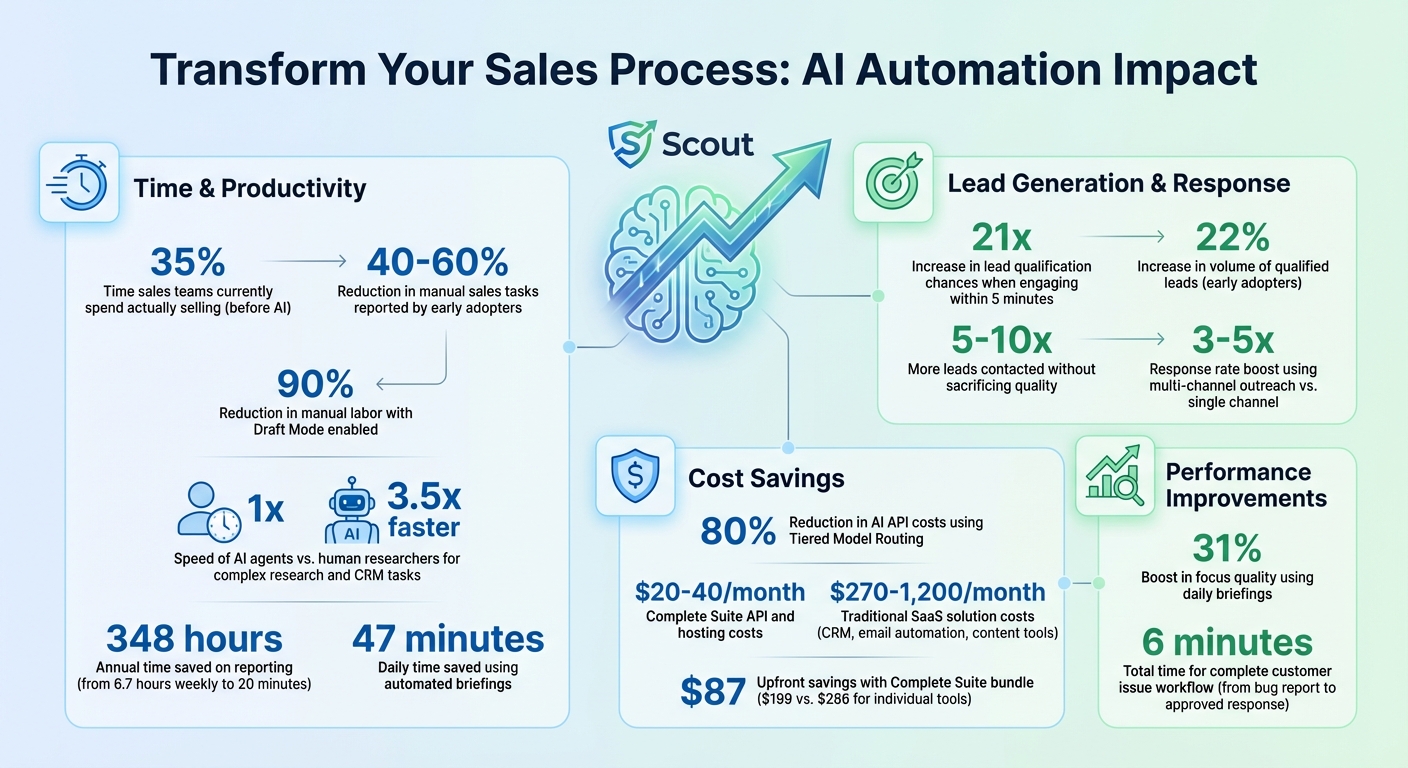
Automated follow-up sequences result in a 22% increase in qualified leads[8] because every prospect gets timely, relevant communication regardless of how busy your week is.
Trigger-Based Sequences
Scout monitors engagement signals — email opens, link clicks, reply timing, and form submissions — and triggers follow-up messages based on prospect behavior[4]. A prospect who opens your proposal three times gets a different follow-up than one who hasn't opened it at all.
Time-Based Sequences
For prospects who go quiet, Scout runs configurable time-based follow-up sequences: Day 1 (initial response), Day 3 (value-add follow-up), Day 7 (check-in), Day 14 (last-chance message). Each message is generated contextually, not from rigid templates[6].
Human Handoff Rules
Not everything should be automated. Scout is configured with handoff triggers — when a prospect asks a technical question, requests custom pricing, or expresses urgency, Scout flags the conversation for human attention and stops the automated sequence. You get a notification via Slack or Telegram with the full conversation context[7].
Lead Scoring and Qualification
Scout assigns a lead score to every prospect based on configurable criteria: company size, industry fit, engagement level, response timing, and stated budget or timeline. Scores update dynamically as new data comes in[8].
Scout Persona
Scout is the best fit when the goal is lead research, outbound follow-up, CRM sync, and pipeline movement.
Qualification Questions
Instead of a static intake form, Scout delivers qualification questions conversationally through email. It asks about budget, timeline, team size, and current tools in a natural sequence that doesn't feel like a survey. Answers are parsed and stored as structured data in your CRM[9].
Scoring Thresholds
Set score thresholds to determine automatic actions: leads above 80 get immediately routed to your calendar for a call, leads between 50-80 enter the nurture sequence, and leads below 50 get a polite resource-sharing response. These thresholds are fully customizable based on your sales cycle and capacity.
The model powering Scout can be selected based on your accuracy and cost requirements — Claude Haiku for high-volume, low-complexity scoring, Sonnet 4 for balanced performance, or Opus for complex multi-factor qualification decisions.
Morning Sales Briefings
Instead of starting your day scrolling through CRM dashboards and email threads, Scout compiles a morning sales briefing that gives you the full picture in under 5 minutes. Operators report saving 47 minutes daily with automated briefings compared to manual pipeline review[14].
"The morning briefing alone is worth the entire setup. I walk into my day knowing exactly which deals need attention, which leads went cold overnight, and which new opportunities came in — all in a single Slack message." — OpenClaw Morning Briefing Guide[14]
What the Briefing Includes
- New inbound leads: overnight submissions with initial qualification scores
- Engagement signals: which prospects opened emails, clicked links, or visited pricing pages overnight[4]
- Follow-up actions: which sequences fired, which got responses, which need human attention
- Pipeline changes: deals that advanced, stalled, or went cold
- Today's priority list: the 3-5 highest-impact sales actions for the day
Briefings are delivered to Slack, Telegram, or email on a configurable schedule. Most operators set delivery for 15 minutes before their workday starts. Total reporting time drops from 20+ minutes of manual dashboard review to a quick scan of a structured summary[12].
Multi-Agent Routing with Atlas and Muse
Scout handles sales-specific workflows, but prospects often trigger tasks that fall outside sales: scheduling internal meetings, creating case studies, drafting proposals, or updating project documentation. Multi-agent routing lets Scout hand off non-sales tasks to the right persona automatically.
Scout to Atlas: Operations Handoff
When a deal closes, Scout routes the new client to Atlas for onboarding workflow automation — welcome emails, account setup tasks, calendar scheduling for kickoff calls, and internal notifications. The handoff includes all qualification data and conversation context so Atlas doesn't start from zero[13].
Scout to Muse: Content Handoff
When Scout identifies a prospect who engaged heavily with specific content topics, it can route those insights to Muse for targeted content creation — a case study about the prospect's industry, a comparison guide addressing their specific objections, or a follow-up resource that addresses their stated pain points.
Routing Configuration
Multi-agent routing runs on OpenClaw's agent coordination layer. Each agent runs as a separate instance with distinct permissions and connected tools. Routing rules are defined in the persona configuration — no custom code required. You can run agents on the same VPS with Docker or across separate machines.
For analytics and pipeline tracking beyond what the CRM provides, Scout can push event data to Linear for task management or BigQuery for custom reporting dashboards[15].
What to Expect
Operators running Scout for sales automation consistently report:
- 22% increase in qualified leads from automated follow-up sequences[8]
- 47 minutes saved daily from automated morning briefings replacing manual pipeline review[14]
- 8-12 hours recovered per week across lead research, follow-ups, CRM updates, and reporting
- 1-2 minute response time on inbound leads vs the industry average of 47 hours[16]
- $18k ARR generated in 30 days by one operator using Scout for automated lead qualification and follow-up[17]
Scout is available in the marketplace →